20 List-Style Instagram Story Templates for Organised Creators in 2026
List-format story content gets saved at a higher rate than any other text-heavy story format. The reason is utility: a list is scannable, retains information efficiently, and gives the viewer a reason to screenshot or bookmark it. A paragraph of advice in a story gets read once. A list of the same advice gets saved, referred back to, and shared.
The challenge is execution. A list story that is badly spaced, uses the wrong font size, or packs too many items into one frame is harder to read than the equivalent content in a caption. These 20 list instagram story template options solve the spacing, hierarchy, and readability problems — so the content lands as intended rather than getting abandoned after the first line.
Why Do List Story Templates Drive More Saves Than Other Formats?
Lists are information-dense without being hard to read. A story viewer has roughly three seconds before they instinctively decide to engage or swipe. A well-formatted list communicates its structure — and therefore its value — within the first second. The viewer knows: this is a list of X useful things. That predictability triggers the save.
Paragraph-format stories do not have this advantage. The viewer has to read the full text to understand if the content is worth saving. On a 15-second story, that is often not enough time. The list format short-circuits that friction.
List story templates have the highest screenshot rate of any story format — which creates passive saves that Instagram’s algorithm reads as high-value engagement, even when the viewer does not formally “save” the story.
What Are the 20 Best List Story Template Styles?
- Numbered Ranked List: Items numbered 1–5, descending order. Best for recommendations, favourites, and “best of” content.
- Bullet Point List: Simple bullets, no hierarchy. Best for unordered recommendations and “things to try” content.
- Checklist Style: Checkboxes (checked or unchecked) with items. Best for task, routine, and “did you do this?” content.
- Yes/No Split: Two columns — things to do vs things to avoid. High engagement, decision-support content.
- Tiered Ranking: Items grouped into tiers (S/A/B tier or Hot/Warm/Cold). Highly shareable, opinionated content.
- Emoji List: Each item prefixed with a relevant emoji. Works for casual, personality-forward content.
- Before/After List: Left column “Before” vs right column “After”. Transformation content, habit-change, product comparison.
- Swipe Series List: First slide introduces the list topic, subsequent slides cover one item each. More depth per item.
- Pros and Cons Table: Two-column layout — pros on left, cons on right. Decision-making and product review content.
- This/Not That: Recommended alternatives to common choices. Strong save rate — practical, actionable format.
- Day Plan List: Hourly or time-block schedule format. Morning routine, productivity, and daily schedule content.
- Alphabet List: A to E or A to Z with one item per letter. Niche-specific, encyclopedic, community engagement.
- Rating Grid: Items with star, number, or emoji ratings shown. Review and recommendation content.
- Favourite Things: Personal list with photo inserts for each item. “Current favourites” and lifestyle content.
- Packing List: Categorised packing list format. Travel and preparation content.
- Reading/Watch List: List of books, shows, or films with mini descriptions. Cultural recommendation content.
- Ingredient/Recipe List: Ingredients and steps in a clean list format. Food and DIY content.
- Rules List: “Rules I live by” or “rules for X” format. Thought leadership and personal brand content.
- Colour-Coded Priority: Items highlighted in green, yellow, red by priority. Productivity and planning content.
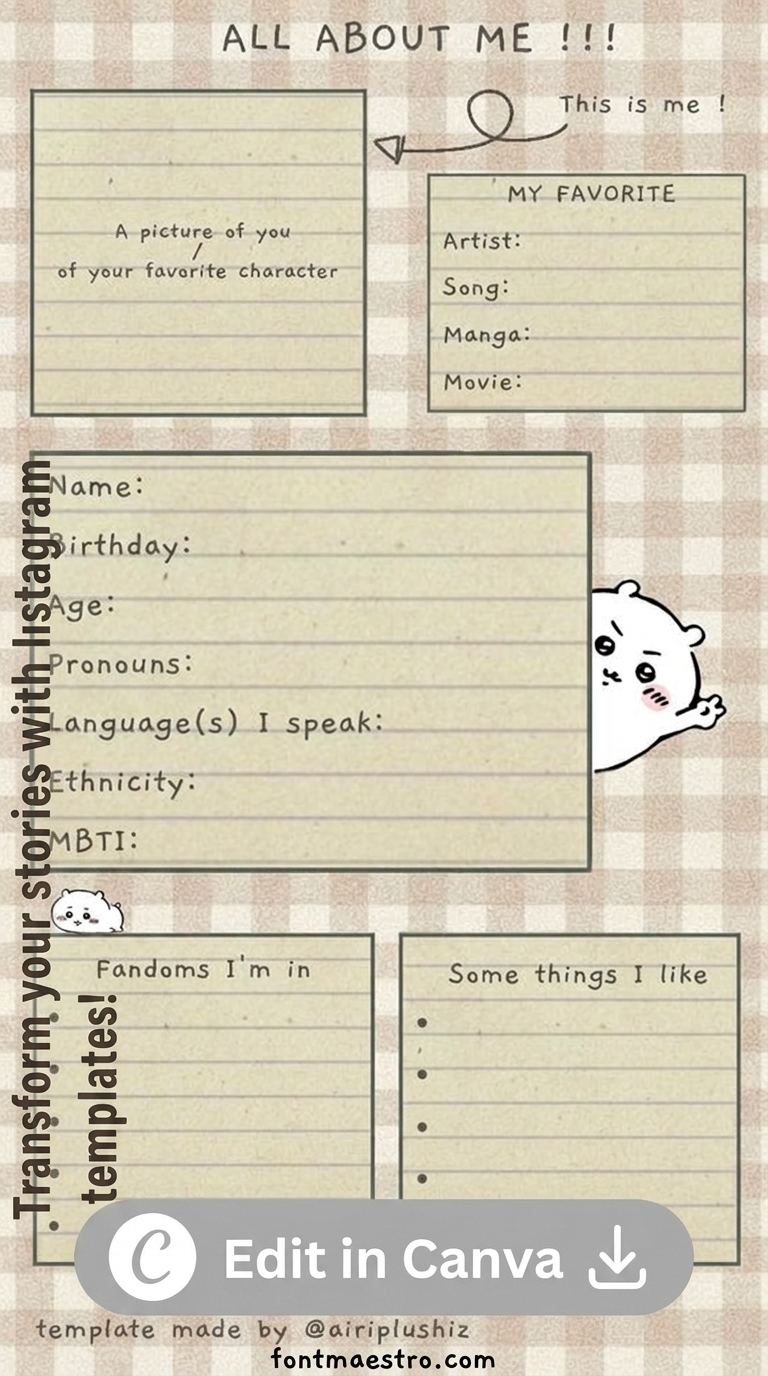
- All About Me: Introduction format with categorised personal facts. Self-introduction and audience connection content.
How Many Items Should a List Story Template Contain?
Five maximum per story frame. This is not a guideline — it is a practical limit based on minimum readable font size (14pt on a 1080×1920 canvas) and minimum line spacing (1.4x). At five items with proper spacing, each item is legible on a phone held at normal reading distance. At six items, the font drops below comfortable reading threshold. At seven or more, the list is genuinely unreadable on most phone screens in the story format.
If the list has more than five items, use a series: a cover story (“7 Things to Know About X”) followed by two or three story slides with three to four items each. The series format works better than forcing everything into one frame and creates a natural “swipe to continue” engagement pattern.
For items that need more than five words each, use three items maximum. A longer description per item takes up more vertical space — three detailed items reads better than five truncated ones that leave the viewer guessing what was cut.
These are Canva and PSD files from Creative Fabrica — open in editor, replace placeholder list items with your content, adjust font size to fit, export at 1080×1920. The All Access plan includes commercial use for business and educational accounts.
Browse List Story Templates on Creative Fabrica →
For clean minimal backgrounds that work under list content, our minimal white Instagram story templates cover the range from stark white to warm ivory. For interactive and social story formats beyond lists, our friends Instagram story templates include group formats and reaction-style layouts that pair well with list-based content series.
Frequently Asked Questions
What is the maximum number of list items for an Instagram story template?
Five items per story frame, assuming items are short (three to five words each). Three items if each item needs a full sentence. For longer lists, use a multi-story series with three to four items per slide.
Should list story templates use numbered lists or bullet points?
Numbered lists for ranked or sequential content — recommendations, best-of, step-by-step. Bullet points for unordered sets where the sequence does not matter — things to try, things to avoid, favourites. Checkboxes for interactive content where the viewer can mentally tick items off as they relate to them.
What font works best in list Instagram story templates?
Clean sans-serif (medium or bold weight) for maximum readability on phone screens. Serif works for editorial and lifestyle list content but requires more spacing to stay legible. Never use script or decorative fonts for list items — they break reading flow when repeated across five lines.
Do list stories work better with or without a photo background?
White or very light neutral background outperforms photo backgrounds for list content in virtually every test. Photo backgrounds create contrast issues for text readability. When the text is the content — as in a list — the background should disappear, not compete.
Can I use a list story template for product recommendations?
Yes — ranked product lists are one of the highest-converting story formats for affiliate and commercial content. “5 Things Worth Buying This Month” consistently outperforms individual product stories in both saves and link taps. Each item should have a short descriptor and, where possible, a visual element (emoji, mini image) to break the text monotony.
Key Takeaways
- List Instagram story templates start on Creative Fabrica’s free plan — the structured format is achievable without design experience
- 20 list template styles covered: numbered ranked, checklist, Yes/No split, tier rankings, Before/After, This/Not That, and more
- Five items maximum per story frame — more than five forces font sizes below comfortable reading threshold on most phone screens
- List stories have the highest screenshot rate of any story format because their structured value is legible within the first second